
A Squarespace to WordPress migration SEO project succeeds or fails on redirect discipline, not on export buttons. Marketing teams often treat the move as a content copy job. Search treats it as a URL change: every indexed path, image, and landing page needs a clear successor, a permanent redirect, and a verification loop in Google Search Console.
This enterprise checklist is how Synct Collective engineers a move Squarespace to WordPress cutover without soft-404 dumps, orphaned equity, or weeks of unexplained ranking noise. It extends the same migration mindset we use in our Wix to WordPress SEO migration guide and the HubSpot CMS to WordPress enterprise guide - inventory first, map second, publish third.
Why Squarespace constraints differ from WordPress ownership
Squarespace optimizes for design velocity inside a hosted CMS. WordPress optimizes for ownership: you control the URL tree, redirect layer, robots rules, schema stack, and hosting edge. That difference matters for Squarespace WordPress 301 redirects and long-term technical SEO.
On Squarespace you typically inherit platform URL patterns, limited server-side redirect control, and export formats that capture pages more reliably than the full SEO contract (canonicals, structured data, attachment URLs, and legacy campaign paths). On WordPress you can reconstruct that contract deliberately - clean architecture, owned redirects, and monitoring you can automate.
Synct Collective does not treat “export then import” as a migration strategy. Fragile export-only moves miss orphaned blog pagination, filtered collection URLs, PDF and image deep links, and marketing paths that still earn impressions. Enterprise work reconstructs content into WordPress with intentional slugs, then maps every meaningful old URL to a living new URL.
Practical rule: if you cannot open a spreadsheet that lists every crawlable Squarespace URL and its exact WordPress destination with a permanent redirect planned, you are not ready for DNS cutover.
Enterprise checklist: preserve SEO when you move Squarespace to WordPress
Follow these stages in order. Changing DNS before the map is ready is how rankings bleed for months.
1. URL inventory and crawl (origin of truth)
Build a complete inventory before touching production DNS:
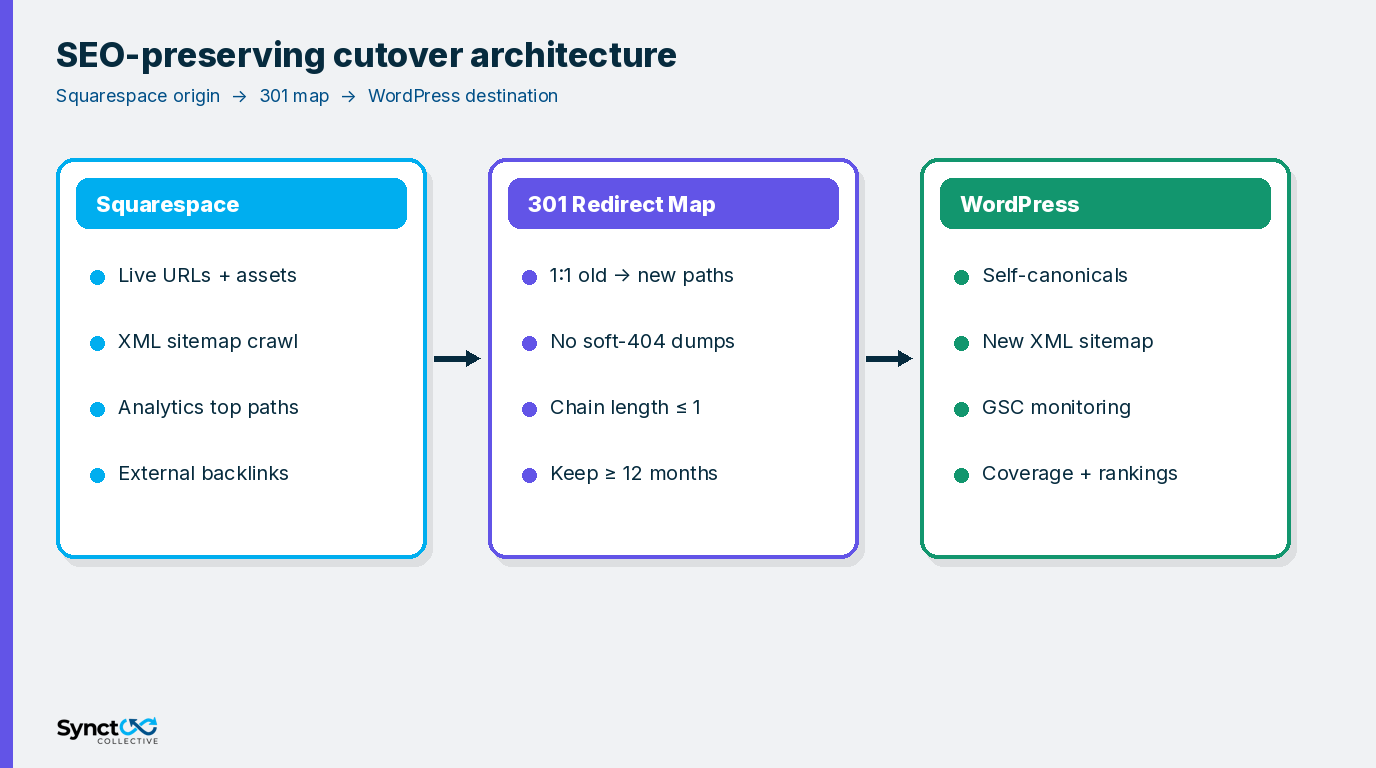
- XML sitemaps from Squarespace as the first seed list.
- Full site crawl for HTML, images, PDFs, and unexpected query variants.
- Analytics and Search Console top landing pages and pages with impressions even if traffic is low.
- Backlink report for externally linked URLs that must not 404.
- Campaign and vanity paths from ads, email, and partner lists.
De-duplicate, normalize trailing slash and host variants, and tag each URL as keep, merge, or retire. Retire only when content is truly gone - and plan an honest 404/410, not a homepage dump.
2. One-to-one 301 map (Squarespace WordPress 301 redirects)
Google’s guidance on site moves with URL changes is clear: prepare a URL mapping, use server-side permanent redirects where possible, avoid long redirect chains, and do not send many unrelated old URLs to a single irrelevant destination. Pair that with their notes on redirects and Google Search.
For a Squarespace to WordPress migration SEO program:
- Prefer 1:1 permanent redirects (HTTP 301 or 308) from each important old path to its new path.
- Redirect directly to the final destination - keep chains preferably at one hop.
- When content consolidates, map multiple old URLs to the single new canonical page that actually replaces them.
- Never mass-redirect the crawl to the homepage; that pattern looks like soft 404 behavior and wastes equity.
- Plan to keep redirects live for a long window (Google recommends keeping them as long as possible, generally at least a year) while you update high-value inbound links.
Implement the map at the WordPress edge you control - server config, reverse proxy, or a maintained redirect layer - so marketing can ship without guessing plugin toggle order. Domain and path isolation patterns that keep estates operable are covered in our note on enterprise WordPress infrastructure and domain isolation.
3. Content reconstruction (not export-only)
Rebuild pages and posts in WordPress with clean HTML structure, intentional headings, and media uploaded into the WordPress media library (or object storage you own). Preserve meaning and conversion paths first; pixel-perfect Squarespace cloning is optional theater.
Checklist for each priority URL:
- Title tag and meta description rewritten for the WordPress slug - not blindly pasted if the slug changed.
- Self-referencing canonical on the new URL.
- Internal links updated to new paths (no reliance on redirects for your own navigation).
- Images and downloadable assets moved and linked to new URLs, with redirects from old asset URLs when they earned links or image search traffic.
- Forms, tracking, and consent tooling verified on staging before cutover.
4. Metadata, robots, and schema readiness
Before go-live, confirm staging is not leaking noindex into production plans. Align robots.txt for the live WordPress host. Re-establish Organization and page-level structured data through your owned WordPress SEO stack so entity signals survive the CMS change. Squarespace schema rarely ports cleanly - treat schema as a rebuild item, not an export artifact.
5. Sitemap cutover and Search Console monitoring
On cutover day:
- Ship the redirect map and confirm sample paths with header checks.
- Submit the new WordPress XML sitemap in Google Search Console.
- Use Change of Address only when the hostname or domain actually changes (not for same-host path redesigns). Google documents when that tool applies in the same site-move guidance linked above.
- Watch Index Coverage / Page indexing, redirect-related errors, and the Sitemaps report as old URLs drain and new URLs rise.
- Spot-check ranking URLs daily for the first two weeks, then weekly until stable.
6. DNS cutover with a zero-downtime mindset
Synct Collective’s enterprise WordPress practice treats CMS migrations as zero-downtime operations: staging parity, warm caches, TLS ready on the destination, and DNS TTL lowered ahead of the switch. Lower TTL days before cutover, freeze content deltas, flip DNS (or traffic routing) only when redirects and critical journeys pass acceptance tests, then raise TTL again after stability.
Have a rollback path: keep Squarespace reachable long enough that a DNS revert is possible if catastrophic issues appear in the first hours. Rollback is not an SEO strategy - the 301 map still matters if you abort - but it protects revenue while engineering fixes blockers.
7. Post-launch verification
Run a structured verification pack:
- Coverage: crawl old URLs and assert expected 301 targets and final 200s.
- Redirect QA: no chains beyond policy, no loops, no accidental 302s on permanent moves.
- On-page: titles, canonicals, and key CTAs on money pages.
- Search Console: spike triage for 404s and server errors within 48 hours.
- Rankings and analytics: annotate the cutover date; expect short-term fluctuation while Google recrawls, which Google describes as normal during site moves.
Decision table: export-only vs engineered migration
- Export-only: fast demo, weak redirect coverage, schema and asset debt, surprise 404s on campaign URLs.
- Engineered migration: crawl-backed inventory, 1:1 map, reconstructed templates, GSC and analytics instrumentation, owned hosting controls.
If search demand funds the business, choose the engineered path. Synct Collective positions WordPress as the durable CMS for teams that need SEO control, integration surface, and long-term ownership - not as a theme swap.
Frequently Asked Questions (FAQs)
Q: How do you migrate Squarespace to WordPress without losing SEO?
A: Inventory every important Squarespace URL, rebuild content on WordPress with correct metadata and canonicals, launch a 1:1 permanent redirect map, submit the new sitemap, and monitor Google Search Console until old URLs drain and new URLs stabilize.
Q: What are Squarespace WordPress 301 redirects and why do they matter?
A: They are server-side permanent redirects from each old Squarespace path to its WordPress successor. They tell search engines and browsers the move is permanent, help consolidate signals to the new URLs, and prevent soft-404 patterns from dumping unrelated URLs onto the homepage.
Q: Can I move Squarespace to WordPress using only the export file?
A: Export is a content starting point, not an SEO migration. Enterprise teams still need a crawl-based URL map, asset redirects, metadata rebuild, and post-launch verification. Export-only projects commonly miss campaign paths and attachment URLs.
Q: Do permanent redirects cause a loss of ranking signals?
A: Google states that 301 and other permanent redirects do not cause a loss in PageRank. Temporary ranking fluctuation during recrawl is still normal; clean mapping and patience matter more than chasing day-one position parity.
Q: When should we use Google Search Console Change of Address?
A: Use it when the domain or subdomain changes as part of the move. Same-domain path redesigns still need redirects and sitemap updates, but Change of Address is aimed at hostname and domain migrations per Google’s site-move documentation.
Plan the cutover like infrastructure - not like a theme import
If your organization needs to move Squarespace to WordPress with measurable SEO continuity - inventory, 301 mapping, and zero-downtime cutover - Synct Collective engineers that migration as part of a durable WordPress estate.
Contact the engineering team at Synct Collective to scope the crawl, redirect map, and go-live rehearsal before DNS changes.


