
Most B2B WordPress sites already output some structured data. The problem is rarely "no schema." It is three plugins each printing their own Organization block, a Service snippet pasted into a page builder widget, and FAQ markup on pages that do not actually show those questions. Search engines and AI answer engines end up with several half-agreeing descriptions of the same company.
This guide shows how Synct Collective approaches WordPress JSON-LD for Organization and Service entities on B2B sites: one connected graph, entities declared once and referenced by @id, and FAQ markup used only where it matches visible content. It builds on our playbook for measuring AI search citations, our notes on AEO domains and AI search engine trust, and the schema patterns in enterprise client portals with RBAC and GEO.
What "nested JSON-LD" means in practice
JSON-LD is a block of JSON inside a <script type="application/ld+json"> tag. Google's introduction to structured data recommends it because it is not interleaved with visible HTML, which makes nested items easier to express and easier for teams to maintain.
"Nested" can mean two things, and you will use both:
- Inline nesting: one object sits inside another, for example a
PostalAddressinside anOrganization. - Graph linking: several top-level objects live in one
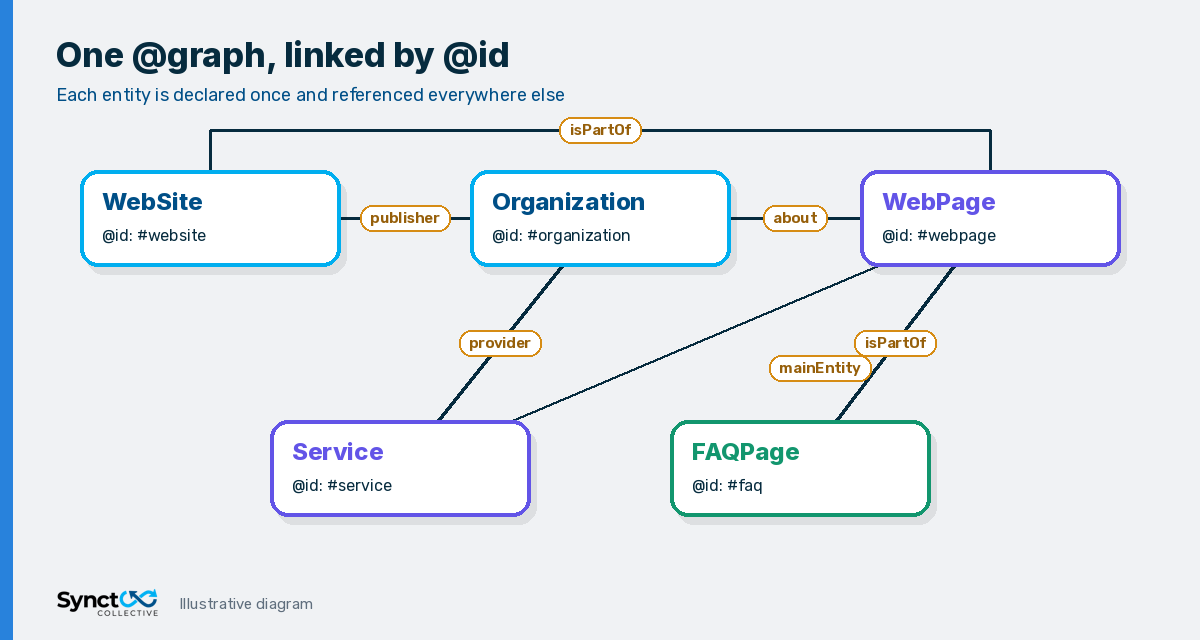
@grapharray and point at each other with@idreferences, for example aServicewhoseprovideris{"@id": "https://example.com/#organization"}.
For B2B WordPress, graph linking is usually the better default. Your company is one entity across hundreds of URLs. Declaring it once and referencing it everywhere keeps the facts consistent and avoids the "twelve slightly different Organizations" problem.
Practical rule: if you search your page source and find more than one
"@type": "Organization"describing your own company, you do not have a nested schema graph. You have duplicates.
Step 1: Define one canonical Organization node
Start with the entity everything else depends on. Give it a stable, resolvable @id on your homepage URL with a hash, such as https://example.com/#organization. Google's own examples now use hash-based @id values for in-page references, and SEO plugins like Yoast SEO already follow that pattern.
Google's Organization structured data documentation lists no required properties and recommends adding the ones that apply. For a B2B firm, the useful core is:
name,alternateName, andlegalNameif the registered name differs.urlandlogo.sameAslinks to profiles you genuinely control, such as LinkedIn, Crunchbase, or a company registry page.addressandcontactPointonly if they are published on the site.- Identifiers like
leiCode,duns, orvatIDonly when they are real and shown somewhere a visitor can verify them.
Keep every value identical to what the About and Contact pages say. Entity clarity is what helps search systems and generative engines resolve "who is this company," and contradictions between schema and page copy undo it.
Local businesses need this most. Our Isle of Man AI search page shows how matching address, company number and areaServed details across your site and directories help AI tools describe you correctly.
Step 2: Attach Service entities to the Organization
Each core service page should describe one primary offer. The schema.org Service type gives you name, description, serviceType, areaServed, provider, and offers. The important link is provider, which should reference the Organization by @id instead of redeclaring the company.
A trimmed example for a single service page looks like this:
{
  "@context": "https://schema.org",
  "@graph": [
    {
      "@type": "Organization",
      "@id": "https://example.com/#organization",
      "name": "Example Co",
      "url": "https://example.com/",
      "logo": "https://example.com/logo.png",
      "sameAs": ["https://www.linkedin.com/company/example-co"]
    },
    {
      "@type": "WebPage",
      "@id": "https://example.com/services/migrations/#webpage",
      "url": "https://example.com/services/migrations/",
      "about": { "@id": "https://example.com/#organization" },
      "mainEntity": { "@id": "https://example.com/services/migrations/#service" }
    },
    {
      "@type": "Service",
      "@id": "https://example.com/services/migrations/#service",
      "name": "WordPress Migration",
      "serviceType": "CMS migration",
      "areaServed": ["GB", "US"],
      "provider": { "@id": "https://example.com/#organization" }
    }
  ]
}
Notice what is missing: no ratings, no invented review counts, no prices that are not on the page. If the page shows a starting price, an Offer with that price is fine. If pricing is "on application," leave offers out rather than guessing.
Step 3: Use FAQPage markup without spam
FAQ schema is where most B2B schema spam lives. Two facts keep it honest:
- Rich result eligibility is narrow. Google's FAQ structured data documentation states the FAQ rich result is only shown for well-known, authoritative government and health websites. Most B2B sites will not get the expanded FAQ display in Google, whatever the markup says.
- The content rules still apply. Google's structured data general guidelines say not to mark up content that is not visible to readers. An answer inside an expandable accordion is fine; a question that only exists in the JSON is not.
So why use FAQPage at all? Because a visible, well-written FAQ is answer-shaped content that humans and AI systems can both extract, and accurate markup describes that section clearly. Keep it disciplined:
- Only mark up questions and answers that appear on that exact page.
- Write real buyer questions, not keyword variations of the same question.
- Do not repeat the same FAQ block sitewide; tie each set to the page topic.
- Never use FAQ markup for ads, sales copy, or user-submitted Q&A threads (that is a different type).
Step 4: Wire it into WordPress without plugin conflicts
On WordPress, the cleanest approach is to extend the graph your SEO plugin already outputs instead of adding a second, disconnected block. If you run Yoast SEO, its schema output is already a single @graph with #organization and #website nodes, and Yoast documents filters for adding or adjusting graph pieces. Other SEO plugins offer similar extension points.
A sensible implementation order:
- Audit current output. View source on the homepage, a service page, and a blog post. List every JSON-LD block and which plugin or widget printed it.
- Pick one schema owner. Disable overlapping schema features in other plugins and page builder widgets so only one system prints Organization data.
- Complete the Organization node in your SEO plugin settings or through its graph filter, using only verifiable facts.
- Add Service pieces on service templates, ideally driven by fields on the page (custom fields or block attributes) so schema and copy cannot drift apart.
- Add FAQPage only on templates where an FAQ section is rendered, generated from the same content source as the visible FAQ.
Generating schema from the same fields that render the page is the real anti-spam control. When an editor changes an answer, the markup changes with it. Our AI search optimization for WordPress work and enterprise WordPress engineering projects follow that pattern for exactly this reason.
Step 5: Validate, then measure
Before and after each release:
- Run key templates through the Rich Results Test for Google-supported features and the Schema Markup Validator for general schema.org correctness.
- Use URL Inspection in Search Console on a sample of pages to confirm Google sees the rendered markup.
- Check that every
@idreference resolves to a node that exists in the same graph. - Watch Search Console enhancement reports for new warnings after plugin updates.
Then measure outcomes, not just validity. A clean graph is clarity infrastructure. Whether it helps your brand get cited is something you track with a fixed prompt panel and citation log, as described in our guide to measuring AI search citations for B2B WordPress.
Common mistakes we see on B2B WordPress sites
- Duplicate Organizations from an SEO plugin, a theme, and a reviews widget all at once.
- Service markup on the homepage listing every offer, while the service pages themselves have none.
- Sitewide FAQ blocks injected into the footer or a global template.
- Unverifiable claims such as aggregate ratings with no visible reviews, or awards that are not mentioned on the page.
- Broken references where
providerpoints at an@idthat no longer exists after a plugin change.
Frequently Asked Questions (FAQs)
Q: What is nested JSON-LD on a WordPress site?
A: It is structured data where related entities are connected instead of printed as separate, unrelated blocks. On WordPress that usually means one @graph in which WebPage, Service, and FAQPage nodes reference a single Organization node by its @id.
Q: Should a B2B site use Organization and Service schema together?
A: Yes, when each service page describes a real offer. Declare the Organization once, then give each service page a Service node whose provider references that Organization. Keep names, areas served, and any prices identical to the visible page.
Q: Is FAQPage schema still worth adding for B2B?
A: Only where a genuine FAQ is visible on the page. Google says FAQ rich results are now limited to well-known, authoritative government and health sites, so most B2B pages will not get the expanded display. Accurate markup can still describe a useful answer section, but stuffing it adds risk without benefit.
Q: Will JSON-LD make AI search engines cite my company?
A: Not on its own. Structured data helps systems understand which entity and service a page is about. Citations also depend on content quality, crawlability, and how trusted your domain is, so pair schema work with ongoing citation measurement.
Q: Can I add JSON-LD in Elementor or another page builder?
A: You can, but avoid creating a second Organization block that conflicts with your SEO plugin. The safer pattern is to extend the existing graph through your SEO plugin's documented hooks, and use page builder content only as the visible source the schema describes.
Want a clean, connected schema graph on your WordPress site?
If your site prints duplicate Organizations, disconnected Service snippets, or FAQ markup that does not match the page, Synct Collective can audit the current output and implement one maintainable graph driven by your real content. Every change is checked and signed off by a senior Synct Collective engineer.
Talk to the team at Synct Collective to scope a structured data review alongside your wider WordPress SEO and AEO work.


