
If you run a local service firm, Google and AI tools need to answer a few simple questions about you: what you are called, where you are, which areas you serve, when you are open and which other websites are talking about the same business. LocalBusiness schema is a small block of structured data that answers those questions in a format machines can read without guessing.
This guide shows how to add LocalBusiness or ProfessionalService schema to a WordPress site, using a made-up Isle of Man firm as the worked example. It covers the properties that matter, how to keep them consistent with your Google Business Profile and directory listings, what to avoid, and how to test the result.
The short answer
LocalBusiness schema is JSON-LD code on your website that describes your business: name, address, map coordinates, opening hours, the areas you serve and links to your other official profiles. To do it well on WordPress:
- Pick the most specific type. For most advisers, agencies and consultancies that is ProfessionalService or a more specific subtype such as AccountingService.
- Match what customers can see. Every detail in the markup should also appear on the page and match your Google Business Profile.
- Output it once. Extend your SEO plugin's existing schema rather than adding a second, competing block.
- Leave out what is not true. No self-written review stars, no addresses you do not use, no areas you do not really serve.
- Test it. Check it with Google's Rich Results Test and the Schema Markup Validator before and after publishing.
What is LocalBusiness schema?
LocalBusiness is a schema.org type for a business with a physical location or a defined service area. It is a subtype of Organization, so it inherits things like name, logo and url, and adds local details such as address, geo coordinates and opening hours.
ProfessionalService is a subtype of LocalBusiness for firms that sell expertise rather than products, such as accountants, lawyers, consultants and agencies. Google's local business structured data guidelines recommend using the most specific subtype that fits.
If you have already read our guide to nested JSON-LD for Organization, Service and FAQ, think of this as the local layer. That post explains how to connect entities in one graph. This one focuses on the location details that tell search engines and AI tools where a business operates.
Why local schema matters for Google and AI answers
Schema does not guarantee a ranking, a map pack position or a mention in an AI answer. What it does is remove ambiguity. When your markup, your visible contact page, your Google Business Profile and your directory listings all say the same thing, systems that compare sources have less reason to doubt which business is which.
That matters most when names overlap or when a business has moved. It also matters for AI tools, which build answers from several sources at once. We explain the wider picture in our guide to getting your business mentioned in Google AI Overviews and ChatGPT.
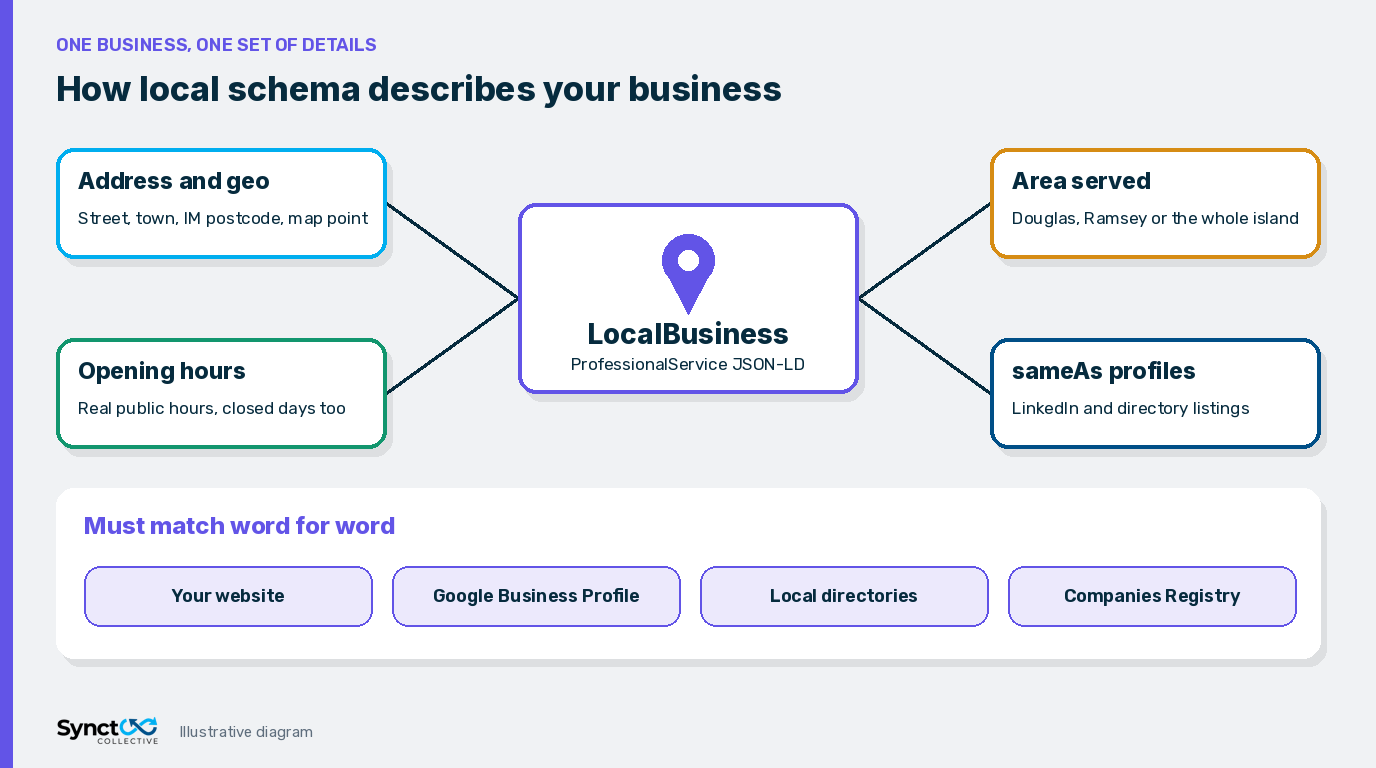
The properties that matter for a local service firm
- @type: ProfessionalService, or a more specific subtype if one fits.
- @id: a stable identifier such as your home page URL plus
#localbusiness, so other schema can reference it. - name: your trading name exactly as it appears on your signage, site and Google Business Profile.
- url and logo: your canonical home page and a crawlable logo file.
- address: a PostalAddress with street, town, postcode and country. Google lists address as required for local business markup.
- geo: latitude and longitude. Google asks for at least 5 decimal places of precision.
- openingHoursSpecification: your real public hours, including the days you are closed.
- areaServed: the towns, regions or country you genuinely cover.
- sameAs: links to profiles that clearly represent the same business, such as your LinkedIn page and directory listings.
Telephone is recommended by Google but not required. If you prefer to be contacted through a form, you can leave it out and point people to your contact page instead.
A worked Isle of Man example
Here is markup for a fictional firm, Example Bookkeeping Co., based in Douglas and serving the whole island. The business, address and URLs are made up for illustration. Replace every value with your own real details.
{
  "@context": "https://schema.org",
  "@type": "AccountingService",
  "@id": "https://www.example.com/#localbusiness",
  "name": "Example Bookkeeping Co.",
  "url": "https://www.example.com/",
  "logo": "https://www.example.com/logo.png",
  "description": "Bookkeeping and payroll for small businesses across the Isle of Man.",
  "address": {
    "@type": "PostalAddress",
    "streetAddress": "1 Example Street",
    "addressLocality": "Douglas",
    "postalCode": "IM1 0EX",
    "addressCountry": "IM"
  },
  "geo": {
    "@type": "GeoCoordinates",
    "latitude": 54.15000,
    "longitude": -4.48000
  },
  "openingHoursSpecification": [{
    "@type": "OpeningHoursSpecification",
    "dayOfWeek": ["Monday", "Tuesday", "Wednesday", "Thursday", "Friday"],
    "opens": "09:00",
    "closes": "17:00"
  }],
  "areaServed": [
    { "@type": "AdministrativeArea", "name": "Isle of Man" },
    { "@type": "City", "name": "Douglas" },
    { "@type": "City", "name": "Ramsey" }
  ],
  "sameAs": [
    "https://www.linkedin.com/company/example-bookkeeping",
    "https://directory-one.example/example-bookkeeping",
    "https://directory-two.example/listing/example-bookkeeping"
  ],
  "parentOrganization": { "@id": "https://www.example.com/#organization" }
}
Isle of Man details people often get wrong
- Country code: the Isle of Man is a Crown Dependency with its own ISO country code,
IM. Using "GB" or "United Kingdom" in addressCountry can contradict your Google Business Profile and directory listings. - No county: Manx addresses do not need a county or addressRegion. Town and IM postcode are enough.
- Doubled place names: watch for addresses like "Douglas, Isle of Man, Isle of Man" after copying between systems. It looks small, but it is exactly the kind of mismatch that makes listings harder to reconcile.
- Island-wide service: many Manx firms serve the whole island from one office. Say so in areaServed, and only list individual towns if your site genuinely talks about working there.
NAP consistency: make your schema match everywhere
NAP stands for name, address and phone, though for many firms it is really name, address, website and email. The rule is simple: the same details, written the same way, everywhere your business appears.
Before writing any schema, list every place your business is described:
- Your website contact page, footer and About page.
- Your Google Business Profile.
- Local directories, such as Manx Directory, LocalIOM and ShopIOM for Isle of Man firms.
- Your Companies Registry entry, LinkedIn page and any trade association listings.
Choose one canonical version of each detail and update the others to match. Then write the schema from that canonical version. Each directory listing that matches can go into sameAs, which helps connect those profiles to your website.
How to add LocalBusiness schema in WordPress
1. Check what your site already outputs
Most SEO plugins, including Yoast, already print an Organization or Person graph. Run your home page through the Schema Markup Validator first so you know what exists. Adding a separate LocalBusiness block that ignores this graph is the most common mistake we see.
2. Extend the existing graph
The cleanest approach is to add LocalBusiness through your SEO plugin's supported settings, add-on or filter hooks, and connect it to your existing Organization with an @id reference. Our nested JSON-LD guide shows the @id pattern in detail.
3. Put it on the right page
For a single office, the markup usually belongs on the home page or contact page, wherever your address is visibly shown. Avoid printing the full LocalBusiness block on every blog post.
4. Keep page builders out of it
If you use Elementor or another builder, use it for the visible address and hours, not for a second hand-written schema block. One source of structured data is easier to keep accurate.
Multiple locations and service-area businesses
Multiple offices
Give each real location its own page with its own address, hours and LocalBusiness markup, each with a unique @id. Link every location back to the main Organization with parentOrganization. Do not list several addresses inside one LocalBusiness object.
Service-area businesses
If customers do not visit you, for example a mobile bookkeeper who works from home, you may hide your address on Google Business Profile. Keep your schema consistent with that choice. Use areaServed to describe where you work, and only publish address details that you are also happy to show on your site. If you have no public premises at all, Organization or ProfessionalService with areaServed is usually more honest than a full street address.
What not to do
- Do not add aggregateRating or review stars for your own business. Google's review snippet guidelines treat reviews a business publishes about itself as self-serving, so they are not eligible for star ratings on LocalBusiness or Organization markup. Invented or copied reviews add risk with no benefit.
- Do not mark up details the page does not show. If the hours or address are only in the code, they are easy to forget when they change.
- Do not create fake locations. Virtual offices or one page per town with a borrowed address can conflict with Google Business Profile rules and undermine trust.
- Do not stuff areaServed. Listing every town on the island does not make you local to each one. Keep it to areas you actually serve.
- Do not let it go stale. Update schema the same day you change your hours, address or name.
How to test your local schema
- Schema Markup Validator: paste your URL into validator.schema.org to check that every schema.org type and property is read correctly, including ones Google does not show as rich results.
- Rich Results Test: run the same URL through Google's Rich Results Test to see what Google detects and any errors or warnings.
- Compare by eye: put the parsed name, address, hours and sameAs links next to your Google Business Profile and directory listings. They should match word for word.
- Recheck after updates: plugin updates and theme changes can quietly duplicate or remove schema, so test again after major changes.
Frequently Asked Questions (FAQs)
Q: Does LocalBusiness schema improve local rankings?
A: Not directly. It helps Google and other systems understand your business details accurately. Rankings still depend on relevance, distance, prominence and the quality of your site and profiles.
Q: Do I need local schema if I already have a Google Business Profile?
A: Your Google Business Profile is the main source for Google Maps. Schema on your website supports it by confirming the same details on your own domain, which also helps other search engines and AI tools.
Q: Should I use LocalBusiness or ProfessionalService?
A: Use the most specific type that fits. ProfessionalService is a subtype of LocalBusiness, and there are more specific options such as AccountingService or LegalService.
Q: Can I add review stars to my own business schema?
A: No. Google treats reviews that a business publishes about itself as self-serving, so they are not eligible for star ratings in search results.
Q: What country code should an Isle of Man business use?
A: Use IM, the Isle of Man's own ISO country code, and keep it consistent with how your address appears on your Google Business Profile and directory listings.
Q: Does Yoast add LocalBusiness schema automatically?
A: Yoast outputs Organization or Person schema by default. LocalBusiness needs an add-on, a supported filter or custom code that extends the same graph instead of duplicating it.
Want your local schema checked?
If you are an Isle of Man business, see our WordPress SEO services in the Isle of Man and our AI search help for Isle of Man businesses. For firms elsewhere, our WordPress SEO and AI search optimization services cover structured data alongside content and indexing. Or talk to our team about what your business needs.


