
You publish a solid page, submit it in Google Search Console, and a week later it sits under "Crawled - currently not indexed." Google found the page, fetched it, and decided not to add it to the index. No error, no penalty, no explanation.
This is one of the most common questions we get from WordPress site owners, and the honest answer is that it is usually a site signal, not a single broken setting. This guide explains what the status actually means, the WordPress patterns that tend to cause it, and the order our team works through when a client's important pages are stuck there.
What "Crawled - currently not indexed" means
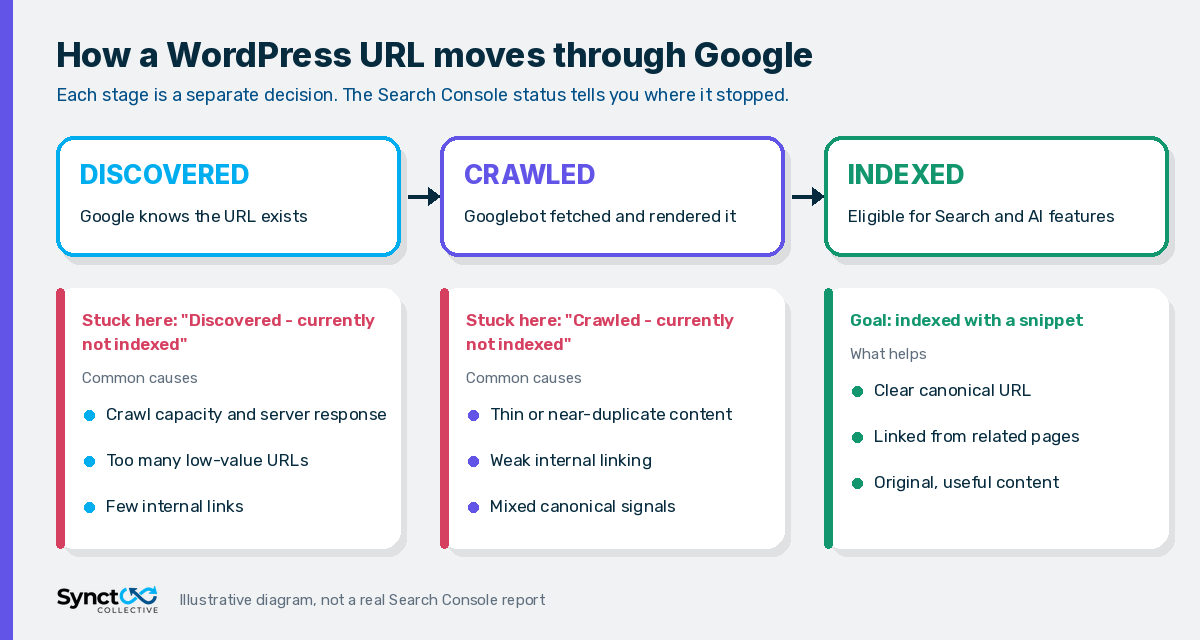
Short answer: Googlebot visited the URL and read it, but Google chose not to index it for now. In Google's own Page indexing report documentation, the page "may or may not be indexed in the future," and there is "no need to resubmit this URL for crawling."
That last line matters. The page was not skipped because Google could not reach it. It was reached, evaluated, and left out. Pressing Request indexing again rarely changes that, because the thing Google evaluated has not changed.
How it differs from "Discovered - currently not indexed"
The two statuses look similar but point to different problems:
- Discovered - currently not indexed: Google knows the URL exists but has not crawled it yet. Google's documentation says this typically happens when crawling was expected to overload the site, so the crawl was rescheduled. Think crawl capacity, server response, and how many low-value URLs are competing for attention.
- Crawled - currently not indexed: Google crawled the page and decided against indexing it. Think page value, duplication, and how clearly the page fits the rest of the site.
A related status, "Duplicate without user-selected canonical," means Google treated the page as a copy of another URL and chose that other URL instead. If you see a lot of these alongside "Crawled - currently not indexed," duplication is very likely part of the story.
Why Google crawls a WordPress page but does not index it
Google does not publish a checklist for this status, so be wary of anyone who promises a single fix. In our experience auditing WordPress sites, the causes fall into a handful of patterns.
1. The page adds little that the index does not already have
Short posts that restate a topic covered better elsewhere, location pages that swap one town name into the same template, and product or service pages with a two-line description all give Google little reason to store another copy. Google's guidance on creating helpful, reliable, people-first content is the best yardstick here: does this page offer something original that a searcher could not get from the pages already ranking?
2. WordPress is generating near-duplicate URLs
Out of the box, WordPress and its plugins can create many thin URLs around one piece of content:
- Tag archives with one or two posts each.
- Date, author, and paginated archives that list the same excerpts.
- Media attachment pages, depending on your SEO plugin settings.
- Filter, sort, and tracking parameters (for example
?orderby=,?utm_source=) that produce new URLs with identical content.
Individually these are harmless. At scale they dilute the signals for the pages you actually care about and leave Google crawling many URLs that are not worth indexing.
3. Weak internal linking
A page that is only reachable from the XML sitemap and a paginated blog archive looks unimportant, because the site itself is not pointing to it. Pages that are linked from relevant service pages, hub pages, and related articles send a much clearer signal about what matters.
4. Mixed canonical and indexing signals
If the canonical tag points one way, the sitemap lists another version, and internal links use a third (trailing slash vs no slash, http vs https, www vs non-www), Google has to guess. Inconsistent signals make it more likely that Google picks a different URL or leaves both out.
5. Content Google cannot fully see when it renders the page
Main content that only appears after a click, loads from a script that fails for Googlebot, or sits behind a consent overlay can make a long page look thin to Google. The URL Inspection tool's live test and View tested page screenshot show what Google actually rendered.
6. It is simply new
Fresh pages on smaller or newer sites often spend some time in this status before being indexed. If the page is genuinely useful and well linked, give it a few weeks before treating it as a problem.
A practical fix order for WordPress sites
When a client's important pages are stuck, our team works in this order. It moves from cheap, high-signal checks to the slower content work.
- Confirm the page should be indexed. Check that it is not set to
noindexin your SEO plugin, not blocked inrobots.txt, and returns a200status. Use URL Inspection on the live URL. - Check which URL Google sees as canonical. URL Inspection shows the user-declared canonical and the Google-selected canonical. If they differ, fix the duplication before anything else.
- Make every signal agree. Canonical tag, XML sitemap entry, internal links, and redirects should all point to the same final URL. Our guide to building a 301 redirect map covers the redirect side after a migration.
- Clean up low-value archives. Decide deliberately which tag, author, date, and attachment URLs deserve to be indexed. Noindex or consolidate the rest, and keep them out of the sitemap.
- Strengthen internal links. Link to the stuck page from two or three genuinely related, already-indexed pages, using descriptive anchor text rather than "click here."
- Improve the page itself. Add the specifics only you can provide: pricing context, process detail, examples, local knowledge, original diagrams, and a clear answer to the question the page targets. Merge pages that compete for the same intent.
- Check crawl health. If you also see a large "Discovered - currently not indexed" count, look at server response times and the number of parameter URLs being crawled. Google's crawl budget guide notes that when a site responds consistently with stable or improving response times, Google can crawl more, while slowdowns and server errors lower that limit. Our Core Web Vitals and speed work often overlaps with this.
- Then request indexing once. After a meaningful change, use Request indexing for the key URL. Repeated requests for an unchanged page do not help.
Practical rule: if a page is stuck in "Crawled - currently not indexed," ask what changed since Google last evaluated it. If the answer is "nothing," another indexing request will not help either.
Why indexing matters for AI search, too
Getting indexed is not only about the classic blue links. Google's documentation on AI features and your website says that to be eligible as a supporting link in AI Overviews or AI Mode, a page must be indexed and eligible to be shown in Google Search with a snippet. There is no special markup that replaces that requirement.
So a page that never gets indexed cannot be cited there, however well it is written. Fixing indexing is the foundation for the AI search optimization work that comes after it, including the local AI search work we do for Isle of Man firms, and it is the first thing we check in any WordPress SEO engagement.
A note for small markets like the Isle of Man
Businesses in smaller markets often try to cover every town with its own page: one for Douglas, one for Ramsey, one for Peel, one for Castletown, each with the same copy and a different place name. Those pages are classic candidates for "Crawled - currently not indexed," because they add almost nothing to each other.
A stronger approach is one well-built service page with genuine local detail, such as where you work, real examples of jobs or projects, and answers to the questions local customers actually ask, plus separate location pages only where you have something different to say. It is the same principle we apply on our own Isle of Man WordPress SEO page.
What not to do
- Do not spam Request indexing for pages that have not changed.
- Do not pad pages with filler to make them longer. Length is not the goal; usefulness is.
- Do not noindex everything at once in a panic. Remove low-value URLs deliberately, and check you are not removing pages that bring in traffic.
- Do not assume a penalty. This status is not a manual action. Manual actions appear in their own Search Console report.
Frequently Asked Questions (FAQs)
Q: Is "Crawled - currently not indexed" an error?
A: No. Google lists it as a reason a page is not indexed, not as an error. It means Google crawled the page and chose not to index it for now. It becomes a problem only when the affected pages are ones you need in search.
Q: How long does it take for a crawled page to get indexed?
A: There is no fixed timeline, and Google says the page may or may not be indexed in the future. New pages on smaller sites often take a few weeks. If an important page is still excluded after that, work through canonicals, internal links, and content quality rather than waiting.
Q: Should I resubmit pages that are crawled but not indexed?
A: Only after you have changed something meaningful. Google states there is no need to resubmit these URLs for crawling, so requesting indexing for an unchanged page is unlikely to help.
Q: Can too many tag or archive pages cause this on WordPress?
A: They can contribute. Large numbers of thin tag, date, author, and attachment URLs make it harder for Google to tell which pages matter. Decide which archives deserve indexing, noindex or consolidate the rest, and keep them out of your XML sitemap.
Q: Does "Crawled - currently not indexed" affect AI search visibility?
A: Yes, for Google's AI features. Google says a page must be indexed and eligible for a snippet to be shown as a supporting link in AI Overviews or AI Mode, so an unindexed page cannot be cited there.
Want a second pair of eyes on your indexing report?
If key service pages or articles are stuck in "Crawled - currently not indexed," our team can review your Search Console data, canonicals, archive setup, and internal links, then implement the fixes that matter. Every change is checked and signed off by a senior Synct Collective engineer. See our WordPress SEO audit and fix sprint or explore our wider WordPress SEO services.


