
A WordPress migration 301 redirect map is the contract that protects rankings when URLs change. Content rebuilds and design polish matter, but search engines follow paths. If the map is incomplete, soft, or unverified, you do not preserve SEO equity during a CMS migration - you gamble with it.
This guide is the artifact-level playbook Synct Collective uses alongside platform checklists such as our Squarespace to WordPress SEO migration checklist, the HubSpot CMS to WordPress enterprise guide, and the Wix to WordPress technical migration guide. The CMS brand changes; the discipline does not: crawl, match, ship permanent redirects, then verify after cutover.
What a migration 301 map actually is
Think spreadsheet-first, not plugin-first. The map is a governed table that answers, for every URL that still matters:
- Source: the old CMS path (normalized host, path, and query policy).
- Destination: the WordPress URL that should own the intent going forward.
- Status code: usually HTTP 301 or 308 for permanent moves; 410 when content is intentionally gone.
- Decision: 1:1 keep, consolidate, or retire - with an owner and a reason.
- Evidence: crawl status, impressions, backlinks, revenue or lead attribution.
- QA state: planned, staged, live-checked, failed, fixed.
Google's guidance on site moves with URL changes and on redirects and Google Search is unambiguous: prepare a URL mapping, prefer server-side permanent redirects, avoid long chains, and do not dump unrelated old URLs onto one irrelevant destination. Your map is how those rules become executable.
Practical rule: if marketing cannot open one shared sheet and see every crawlable equity URL with a final destination and a permanent redirect plan, you are not ready for a zero-downtime WordPress cutover.
Step 1: Build the crawl inventory that covers equity
Export buttons lie by omission. Seed the inventory from multiple systems, then reconcile:
- XML sitemaps from the origin CMS as the first seed list.
- Full site crawl for HTML, images, PDFs, pagination, filtered collections, and odd query variants.
- Google Search Console pages with impressions (including low-traffic URLs that still earn branded or long-tail demand).
- Analytics landing pages and conversion paths from the last 12 to 16 months.
- Backlink export for externally linked URLs that must not 404.
- Campaign and vanity paths from ads, email, partners, QR codes, and sales decks.
Normalize trailing slashes, www vs apex, HTTP vs HTTPS, and case where the origin is case-insensitive. Collapse pure tracking query strings into a policy column rather than inventing a unique row per UTM variant. Tag each URL with priority: money page, content equity, asset, thin/duplicate, or retire candidate.
This inventory is also where Synct Collective separates "pretty demo migration" from enterprise work. Orphaned blog pagination, attachment deep links, and old campaign paths rarely appear in a CMS export, but they still show up in crawls and GSC.
Step 2: Match rules - 1:1, consolidate, or retire
Matching is editorial and technical at once. Use explicit rules so two engineers produce the same map:
- 1:1 permanent redirect when the WordPress page is the clear successor for the same intent. Prefer one hop from old path to final path.
- Consolidate when several thin or overlapping origin URLs become one stronger WordPress canonical. Map each old URL to that single living page - not to a section hub that only vaguely relates.
- Retire honestly when content is gone for good. Prefer a true 404/410 over a homepage dump that behaves like a soft 404.
- Assets earn rows too. Image and PDF URLs with backlinks or image-search demand need destinations (or intentional retirement), not silent 404s.
- Internal links are not redirects. Update WordPress navigation and in-content links to new paths so your own estate does not depend on the redirect layer.
Document decision notes in the sheet. Six months later, "why does /services/legacy point here?" is a support ticket you can answer from the map instead of archaeology.
Suggested column set
old_url,old_path,new_url,new_pathhttp_status_planned(301 / 308 / 410)match_type(1:1 / consolidate / retire)priority(P0 money / P1 content / P2 asset / P3 cleanup)impressions_90d,backlinks,conversions_flagowner,notes,qa_status,last_checked_at
Step 3: Implement for zero-downtime WordPress cutover redirects
The map only protects equity if it is live at the moment traffic flips. Synct Collective's enterprise WordPress practice treats redirects as infrastructure:
- Generate machine-readable rules from the sheet (CSV to server config, reverse-proxy map, or a maintained redirect store - pick one source of truth).
- Stage the rules on the destination stack and prove sample paths with header checks before DNS or traffic routing changes.
- Keep chains at one hop wherever possible; resolve intermediate hops in the map before go-live.
- Prefer permanent server-side redirects (301 or 308). Temporary 302s for a permanent CMS move confuse canonicalization.
- Lower DNS TTL ahead of cutover, freeze content deltas, flip only after acceptance tests pass, then keep redirects for a long window (Google recommends keeping them as long as possible, generally at least a year) while you update high-value inbound links.
Where multiple hostnames, microsites, or email-sending domains sit around the marketing CMS, pair the map with clean estate patterns from our note on enterprise WordPress infrastructure and domain isolation. Redirect chaos often starts when hosts and paths are not owned deliberately.
Step 4: Verify after cutover - headers, crawl, GSC
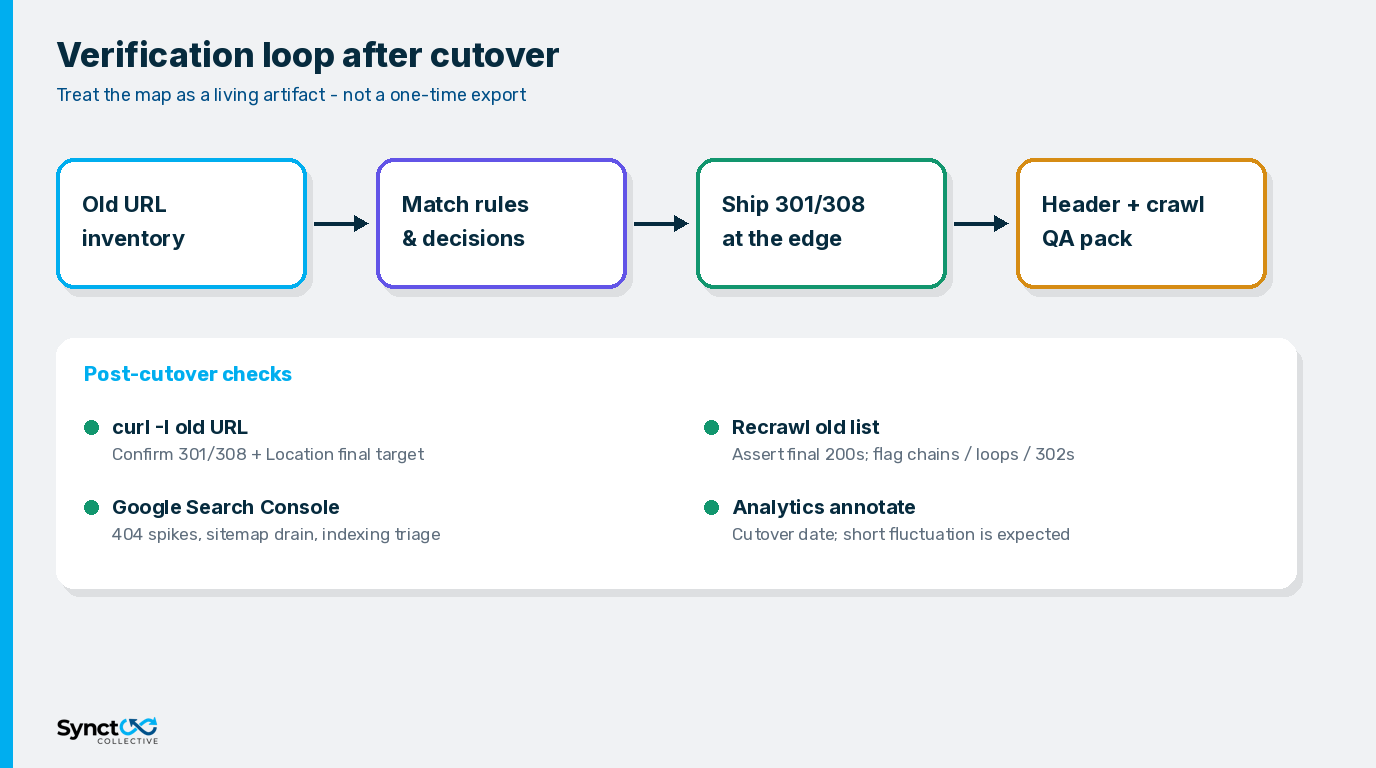
Shipping the map is not the finish line. Run a verification loop the same week as cutover:
- Header QA: for a stratified sample (all P0, most P1, sample of the rest), request the old URL and assert status,
Location, and final 200 destination. Catch accidental 302s, loops, and HTML "redirects" that never send a proper status. - Old-URL crawl: recrawl the full source list against production. Diff expected vs actual. Fail the release checklist on homepage dumps, chains beyond policy, and missing rows.
- Google Search Console: submit the new WordPress sitemap, watch Page indexing and crawl anomalies, and triage 404 spikes within 48 hours. Use Change of Address only when the hostname or domain actually changes.
- Analytics annotation: mark the cutover date. Short-term fluctuation while Google recrawls is normal during site moves; unexplained 404 growth is not.
- Inbound link hygiene: update the highest-value external links you control (partners, directories, paid landing references) so equity does not rely on redirects forever.
Write QA results back into the sheet. A map without qa_status becomes fiction the first time someone "fixes" a redirect in production without updating the source file.
Failure modes that burn SEO equity
- Homepage mass redirects for unrelated old URLs - classic soft-404 pattern.
- Export-only inventories that miss campaign paths, attachments, and GSC-only URLs.
- 302s for permanent moves that weaken the permanent-move signal.
- Redirect chains from old CMS → temporary vanity → final WordPress slug.
- Map drift when staging rules and production rules diverge on cutover night.
- No post-launch crawl so broken rows stay invisible until rankings move.
If search demand funds pipeline, treat the redirect map with the same seriousness as DNS and TLS. Design systems can iterate after launch; missing 301s are expensive to reconstruct after equity has already leaked.
Frequently Asked Questions (FAQs)
Q: What is a WordPress migration 301 redirect map?
A: It is the governed list of old CMS URLs, their WordPress destinations, planned permanent redirect status codes, and QA state. It is how you preserve SEO equity during a CMS migration instead of hoping an export or plugin catches every path.
Q: Should every old URL get a 1:1 redirect?
A: Prefer 1:1 when intent still has a living page. Consolidate overlapping URLs to one canonical destination when that is honest. Retire true dead content with 404/410 rather than sending everything to the homepage.
Q: How do zero-downtime WordPress cutover redirects work with the map?
A: Load and prove the redirect rules on the destination before traffic flips, keep hops short, use permanent server-side redirects, and verify old URLs with headers and a crawl immediately after cutover so users and crawlers never see a gap.
Q: How long should migration redirects stay in place?
A: Keep them as long as practical - Google generally recommends at least a year - while you update high-value inbound links. Removing redirects early reopens 404 risk for bookmarks, campaigns, and slow-recrawled URLs.
Q: Which Google docs should the team align on before cutover?
A: Align on Google Search Central guidance for redirects and for site moves with URL changes, then encode those rules into your map columns and QA checklist.
Need the map engineered before DNS moves?
If your organization needs a crawl-backed WordPress migration 301 redirect map with match rules, edge implementation, and post-cutover verification - for Wix, HubSpot, Squarespace, or a custom CMS - Synct Collective builds that artifact as part of a durable WordPress estate.
Contact the engineering team at Synct Collective to scope the inventory, redirect spreadsheet, and go-live QA before cutover.


