
What is an enterprise WordPress client portal?
An enterprise WordPress client portal is a secure, role-governed area of a WordPress system (or a dedicated application built on the WordPress stack) where authenticated users access account-specific data, documents, workflows, and dashboards. Unlike a simple “members area”, it models business roles, enforces permissions server-side, and separates private operational data from the public marketing site that search engines and generative AI systems actually cite.
For Isle of Man and UK B2B organizations, portals typically sit alongside a high-performance public site: proposals, case studies, and service pages stay crawlable; invoices, contracts, and client records stay behind proper role-based access control (RBAC). Done well, the public layer becomes the entity surface for technical SEO, answer engine optimization (AEO), and generative engine optimization (GEO), while the portal remains a governed application, not a leaky CMS plugin stack.
Why portals fail when treated as “membership plugins
Many teams start with a membership add-on, a few user roles, and front-end visibility rules. That pattern breaks under enterprise load for predictable reasons:
- UI hiding is not security. Hiding a menu item or wrapping a shortcode does not stop direct URL access, REST queries, or search indexing of private attachments.
- Default roles are too coarse. Administrator, Editor, and Subscriber do not map to Account Manager, Client Approver, Auditor, or Partner Reseller.
- Public and private content share one template layer. Without clear content contracts, schema plugins, sitemaps, and AI crawlers can surface URLs or metadata that should never leave the authenticated perimeter.
- Data model drift. Storing transactional records as ordinary posts inflates the posts table and blurs what belongs in search versus an application database.
Enterprise portal work is therefore architecture first: roles and capabilities, query filtering, storage boundaries, and a deliberate public schema graph. Presentation tools, whether block-based templates or a maintained marketing front end, sit on top of that contract, not instead of it.
RBAC on WordPress: capabilities, not just roles
RBAC means every privileged action is gated by a named capability, and every role is a bundle of those capabilities. On WordPress, the durable pattern is:
- Register custom post types (or custom tables) with explicit
capability_typeandmap_meta_capso create, edit, read, and delete map to your domain verbs. - Define roles such as Client Viewer, Client Contributor, Internal Account Lead, and Compliance Reviewer, each with the minimum capabilities required.
- Enforce access in PHP and in REST callbacks before any HTML or JSON is returned. Never rely on CSS, JavaScript, or “private” post status alone for multi-tenant portals.
- Scope queries: a client must only ever see their own objects. Filter
pre_get_posts, REST collection queries, and any custom SQL so the wrong tenants data never leaves the server.
For high-concurrency portals, many organizations pair WordPress roles with custom MySQL tables and bi-directional REST APIs under the same capability checks. Editorial content stays in familiar WordPress models; operational volume stays off the default posts table, aligned with bespoke portal engineering rather than another membership plugin.
Practical rule: if a user can guess a URL or call an endpoint and retrieve another account’s document, you do not have RBAC; you have obscurity.
Authentication boundaries that hold under audit
Enterprise buyers increasingly ask how portals survive security reviews. Minimum expectations include:
- Strong authentication (SSO where required), session hardening, and least-privilege admin accounts.
- Object-level authorization on every download, PDF, and API response.
- Clear separation of super-admin platform duties from day-to-day client administration.
- Logging of privileged reads and exports for regulated sectors.
A lean WordPress architecture (fewer plugins, scoped assets, and caching discipline) supports the portal, but it cannot compensate for missing capability checks. Access design belongs in the application layer first.
Public schema graphs for GEO without exposing portal data
Generative engine optimization (GEO) is the practice of making public content easier for generative systems to retrieve, verify, and cite accurately. Structured data (JSON-LD) is not a magic citation switch, but it is anti-hallucination infrastructure: it tells machines which organization you are, what services you offer, and which answers are canonical.
For Synct-style enterprise sites, the useful split is sharp:
- Public marketing and authority pages carry a nested schema graph: Organization, WebSite, WebPage, Service, Article, and FAQPage where genuine Q&A appears on the page.
- Authenticated portal routes stay out of sitemaps, out of public schema, and behind robots and auth gates. Portal entities are application data, not Knowledge Graph fodder.
What a maintainable public graph looks like
A durable pattern used across high-trust B2B sites:
- One Organization entity with a stable
@id(for example, your canonical homepage hash URI), matching postal details, and verifiedsameAslinks to official profiles. - WebSite and WebPage markup so each public URL declares how it relates to that organization.
- Entity-appropriate types on revenue pages: Service for offers, Article for deep guides, FAQPage only when the questions and answers are visible on the page.
- Consistent publishers and authors so E-E-A-T signals stay coherent across the graph.
- Validation against visible content: markup that invents answers for crawlers is a spam risk, not a GEO tactic.
Nested JSON-LD graphs help search and answer systems resolve who you are, what you offer, and where you operate, without inventing facts. That complements domain authority and AEO: the domain earns trust; the schema clarifies entities; the prose supplies citeable answers.
GEO checklist for portal-backed organizations
- Answer-first sections on key public pages so models can extract a clean passage.
- Server-rendered HTML for critical facts; do not bury the only accurate description behind client-only interactions.
- Internal links from service pages to deeper architecture guides (and back) so crawlers and humans share the same information hierarchy.
- Crawler policy that allows legitimate search and AI bots on public marketing URLs while keeping authenticated paths closed.
- Measurement that tracks citations and branded queries, not only classic blue-link rankings.
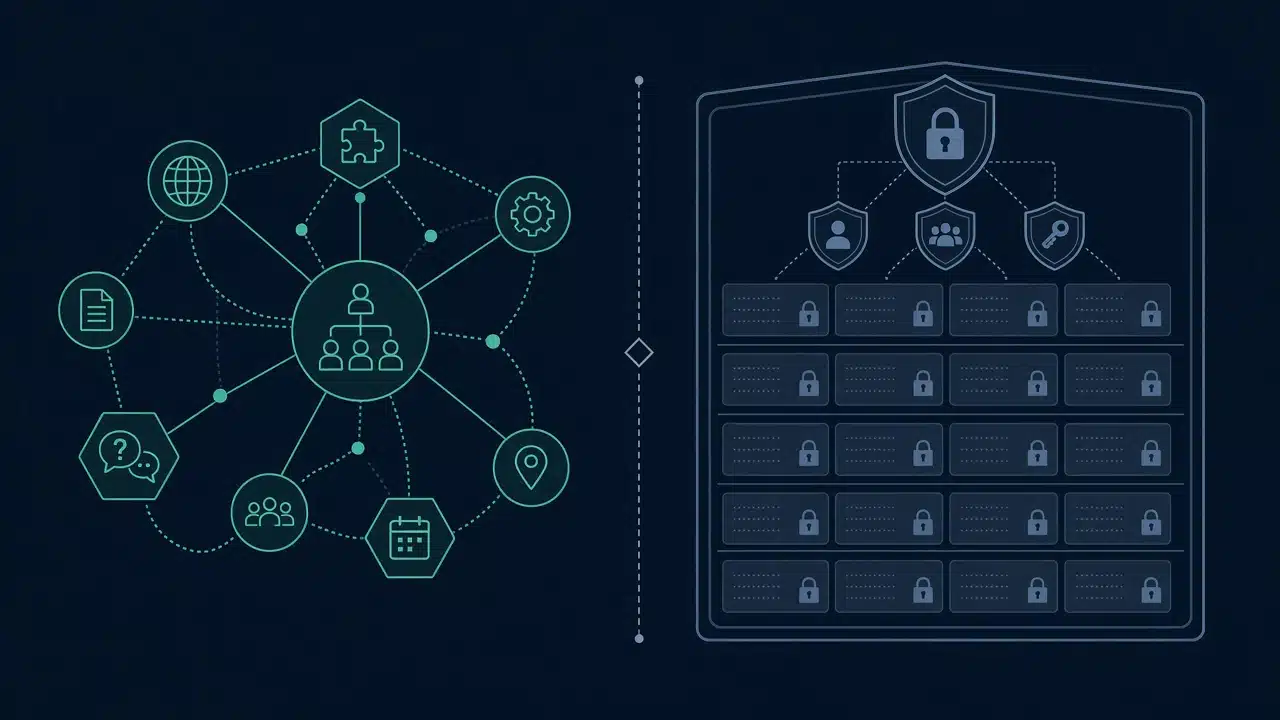
Architecture pattern: two surfaces, one WordPress estate
A practical enterprise layout looks like this:
- Public site: services, thought leadership, case studies, locations, and schema graph. Optimized for Core Web Vitals, technical SEO, and GEO citation.
- Portal application: RBAC dashboards, document libraries, approval workflows, and APIs. Optimized for correctness, concurrency, and auditability.
- Shared identity and branding: SSO or unified login UX where needed, without merging private objects into public templates.
- Integration contracts: CRM, billing, or document systems remain systems of record where appropriate; WordPress owns publishing state and portal UX, not every transactional truth.
This pattern scales whether you extend WordPress with custom tables or keep editorial content in Gutenberg-friendly models on the marketing surface. Front-end tooling for marketing pages should follow performance budgets and editorial workflow, not dictate portal permission enforcement.
Implementation steps teams can run this quarter
- Inventory roles and objects. List every actor (client, partner, internal) and every object (project, invoice, file, ticket). Map who may create, read, update, delete, and export each object.
- Register capabilities before UI. Build capability checks and query filters first; dashboards second.
- Choose storage by volatility. Editorial narratives and public FAQs stay in content types suited to publishing. High-volume transactional records prefer custom tables with indexed foreign keys to accounts.
- Lock down discovery. Exclude portal routes from XML sitemaps, set appropriate robots rules, and verify no private attachments are publicly reachable.
- Ship the public graph. Organization + Service + FAQ on the pages people already trust; validate with Schema.org and Googles Rich Results Test.
- Regression-test two paths. (a) Unauthenticated crawl of public HTML and JSON-LD. (b) Authenticated cross-tenant attempts that must fail closed.
- Document the contract for future developers: role catalog, endpoint matrix, schema
@idconventions, and ownership of each integration.
Teams already investing in lean architecture, object caching, and technical SEO can layer portal RBAC and GEO schema without rewriting the estate, if content and permission boundaries stay explicit.
How this complements Synct’s engineering themes
Client portals sit at the intersection of several Synct Collective service themes: bespoke systems and role-based dashboards, nested JSON-LD for search and AEO, and lean architecture that keeps private workloads from slowing public pages. Internal linking opportunities from this article include the primary services overview for enterprise WordPress engineering and infrastructure, deeper pieces on database and custom post type scale, lean plugin-light architecture, and AEO or domain-authority guidance, each reinforcing the same message: public trust surfaces and private application surfaces must be designed together.
From our office in Douglas, we help organizations run WordPress as an engineered platform rather than a loosely coupled plugin stack. For Manx companies, see how we approach GEO and AEO in the Isle of Man.
Frequently Asked Questions (FAQs)
Q: What is RBAC in a WordPress client portal?
A: RBAC (role-based access control) assigns permissions through named capabilities bundled into roles. In a WordPress portal, every sensitive action (viewing an invoice, downloading a contract, listing another account’s projects) must be authorized server-side against those capabilities, with queries scoped to the user’s tenant.
Q: Can WordPress support enterprise client portals without becoming insecure?
A: Yes, when you treat WordPress as an application platform: custom capabilities, mapped meta capabilities, REST and query filtering, hardened authentication, and a hard split between public content and private objects. Insecurity usually comes from UI-only “protection” and shared templates that leak private URLs into sitemaps or search.
Q: How does generative engine optimization relate to a client portal?
A: GEO applies to the public pages that explain who you are and what you offer. Accurate Organization, Service, and FAQ schema, plus clear, answer-first copy, helps generative systems cite the right facts. Portal data should remain authenticated and unpublished; GEO is not a reason to expose private client records to crawlers.
Q: Should portal pages have FAQPage or Service schema?
A: Only if those pages are intentionally public and the marked-up text is visible to users. Authenticated dashboard routes should not emit marketing schema or appear in public sitemaps. Keep Service and FAQPage markup on crawlable marketing and support articles instead.
Q: What is the difference between AEO and GEO for B2B WordPress sites?
A: AEO focuses on structuring content and entities so answer engines can return precise responses; GEO emphasizes retrieval, verification, and citation inside generative systems. In practice they overlap: consistent entities, visible answers, and validated JSON-LD support both, while classic technical SEO remains the foundation.
Build a portal that stays secure and citeable
If your organization needs a role-governed WordPress client portal with a clean public schema graph for search and generative engines, Synct Collective designs both surfaces as one engineered estate.
Contact the engineering team at Synct Collective to schedule a portal architecture and GEO schema review.


