
A multi-tenant WordPress portal serves many client organizations from one WordPress estate - shared application code, separate data boundaries. The failure mode is familiar: stack a membership plugin, a file-protection plugin, a roles plugin, and a “tenant” add-on, then hope UI rules keep accounts apart. That is plugin sprawl, not isolation.
True WordPress tenant isolation is an architecture contract: every query, download, and REST response is scoped to a tenant, enforced server-side, and testable under cross-tenant attack. This guide extends our work on enterprise WordPress client portals with RBAC and GEO schema and the operational patterns in WordPress client portals for onboarding, files, and approvals. Same platform mindset - now focused on how to isolate client data without turning WordPress into a plugin landfill.
What multi-tenant means on WordPress (and what it does not)
Client data isolation WordPress design starts with a clear definition. Multi-tenant here means one deployed WordPress application that hosts many customer accounts (tenants), each with users, projects, documents, and workflows that must never bleed across accounts. It does not mean “a Multisite network for every client” by default, and it does not mean “hide the menu item and call it secure.”
Three patterns show up in the wild:
- Shared database, shared tables, tenant key on every row - the usual single-site portal model. Fast to operate; isolation quality depends entirely on query discipline.
- Shared code, separate databases or schemas per tenant - stronger blast-radius control; higher ops cost.
- WordPress Multisite per tenant - useful for fully separate sites; often the wrong default for a unified client portal UX with shared branding and workflows.
Most B2B portal builds that Synct Collective engineers choose the first pattern with hard scoping rules - then graduate storage for high-volume objects as described in our guide to WordPress database schema and CPT optimization.
Practical rule: if a logged-in user from Tenant A can list, open, or download Tenant B’s objects by changing an ID in a URL or REST call, you do not have a multi-tenant portal - you have a shared CMS with hope.
Why plugin sprawl fails at tenant isolation
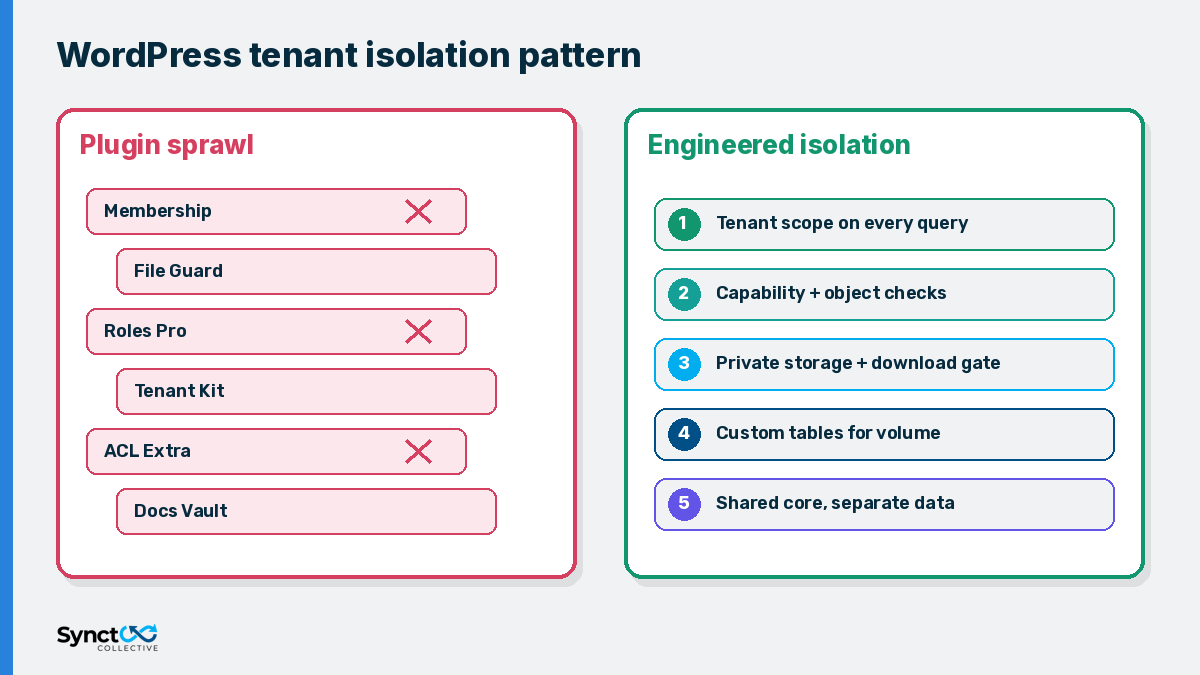
Membership and “private content” plugins optimize for visibility toggles. Multi-tenant portals need object-level authorization and query filters on every path - including REST collections, admin-ajax, download handlers, search, and exports. Stacking plugins creates overlapping role models, duplicate capability names, and gaps where one plugin assumes another already filtered the query.
Common failure modes:
- UI-only protection - shortcodes and theme conditions hide links; direct endpoints still return data.
- Global roles without tenant context - “Client Approver” can approve anything unless every check also binds an account ID.
- Public Media Library attachments - guessable URLs leak contracts across tenants.
- Unscoped REST - collection endpoints return other tenants’ CPTs when
authoror meta filters are omitted. - Plugin update churn - each vendor ships its own ACL story; your security review never stabilizes.
A durable bespoke WordPress portal replaces that pile with a thin application layer you own: tenant membership, capability map, storage boundary, and audit log. Presentation - including whatever marketing front end your team already maintains - sits on top of that contract.
Architecture: isolate client data in five contracts
Treat isolation as five explicit contracts. Skip any one and sprawl creeps back in.
1. Tenant identity on the session
Every authenticated request must resolve to a tenant (account) ID - from group membership, a custom user meta binding, or SSO claims - before business logic runs. Users may belong to multiple tenants; the active tenant must be unambiguous for the request (header, path prefix, or session switcher with server-side confirmation).
2. Capability checks plus tenant scope
Follow established NIST role-based access control ideas: least privilege, clear duties, auditable decisions. On WordPress, register domain capabilities (view_portal_document, approve_deliverable) and map them to roles - then require both capability and matching tenant on the object. Capability alone is not enough in a multi-tenant WordPress portal.
3. Query filters that fail closed
Scope pre_get_posts, custom SQL, and REST collection queries so missing tenant context returns empty - never “all rows.” Prefer indexed tenant foreign keys on custom tables for operational volume; keep public editorial content in normal post types that stay out of the portal data path.
4. Private file storage and authorized downloads
Store client files outside the publicly served uploads tree. Every download streams through a handler that re-checks capability and tenant. If an unauthenticated or wrong-tenant request can fetch bytes by URL, isolation is broken - the same private-library discipline we outline for onboarding document portals.
5. API and integration hygiene
Portal JSON is an application API. Align threat modeling with guidance such as the OWASP API Security project: broken object-level authorization and excessive data exposure are the classic multi-tenant bugs. Re-authorize on every ID; never trust a client-supplied tenant ID without membership proof. Keep the codebase lean as well: our guide to cutting WordPress plugin bloat shows how fewer dependencies keep authenticated portal routes fast and predictable.
A lean stack beats a plugin pile
You do not need a marketplace’s worth of ACL plugins. A focused build usually needs:
- Custom post types or custom tables for portal objects, with explicit
capability_type/map_meta_cap(or equivalent table-level checks). - A tenant membership model - which users belong to which account, with roles per membership.
- Central authorization helpers - one function path used by templates, REST, and download handlers.
- Audit events - who read or exported what, when, under which tenant.
- Automated cross-tenant tests - CI or staging scripts that attempt IDOR-style access and must fail.
That is fewer moving parts than five overlapping plugins - and it is reviewable by security and compliance teams. Synct Collective’s portal engineering on the main services site follows this contract-first approach rather than chasing another membership SKU.
Implementation checklist for this quarter
- Inventory tenants and objects - accounts, users, projects, files, approvals, exports.
- Define membership and roles - per-tenant role bindings, not only global WP roles.
- Register capabilities before UI - dashboards second.
- Add tenant columns and indexes - fail closed in every list query.
- Move files behind download gates - deny direct public paths.
- Lock REST and admin-ajax - same checks as HTML routes.
- Keep public GEO/AEO schema off portal routes - marketing pages stay crawlable; portal data stays out of sitemaps (see the RBAC/GEO pillar).
- Regression-test cross-tenant access - including downloads and search.
Frequently Asked Questions (FAQs)
Q: What is a multi-tenant WordPress portal?
A: It is a single WordPress application that serves many client organizations from shared code while keeping each tenant’s users, files, and workflows isolated through server-side authorization and tenant-scoped queries - not through hiding menu items alone.
Q: What is WordPress tenant isolation?
A: WordPress tenant isolation means every read, write, list, and download is limited to the active account’s data. Isolation fails if changing an object ID or calling a REST endpoint reveals another client’s records.
Q: How do you achieve client data isolation on WordPress without plugin sprawl?
A: Own a thin application layer: tenant membership, domain capabilities, scoped queries, private storage with authorized downloads, and cross-tenant automated tests. Avoid stacking multiple membership and ACL plugins that each implement a different permission story.
Q: Is WordPress Multisite required for multi-tenant portals?
A: No. Multisite can separate sites, but most unified client portals use one site (or one app) with a tenant key on every operational row, plus hard query and download filters. Choose Multisite when you truly need separate site trees, not as a substitute for object-level authorization.
Q: How does RBAC relate to multi-tenant isolation?
A: RBAC answers what a role may do; tenant scope answers whose data it may touch. Enterprise portals need both - a Client Approver in Tenant A must not approve Tenant B’s deliverables even if the capability name matches.
Build isolation into the portal - not into another plugin stack
If your organization needs a multi-tenant WordPress portal with real client data isolation - scoped queries, private documents, and audit-ready RBAC - Synct Collective engineers that surface as part of a durable WordPress estate.
Contact the engineering team at Synct Collective to map tenant boundaries and authorization contracts before the next plugin install.


