
A WordPress technical SEO checklist covers the parts of your site that decide whether Google can find, crawl, index and understand your pages: index settings, canonicals, redirects, sitemaps, internal links, Core Web Vitals and structured data. The order matters more than the length of the list. Fix anything that blocks indexing first, then duplicates and redirects, then structure, and only then speed and schema.
This checklist is written for WordPress site owners, marketers and in-house developers who want to check their own site, or who want to know what a proper technical SEO audit should cover before paying for one. Each section says what to check, where to check it in WordPress, and what a good result looks like.
The short answer: check these in order
- Crawl and index controls. Nothing important is set to noindex or blocked in robots.txt.
- Canonicals and duplicates. One version of every page, on one host, with a self-referencing canonical.
- Redirects and broken links. Old URLs 301 to the right new page, with no chains and no internal links to 404s.
- XML sitemaps. One sitemap, submitted in Search Console, listing only pages you want indexed.
- Site structure and internal links. Important pages are linked from relevant pages, not orphaned.
- Core Web Vitals. Real-user data passes for your key templates.
- Structured data. Valid, accurate schema that matches what is on the page.
- Template-level on-page basics. Unique titles and meta descriptions, one H1, sensible headings and alt text.
What you need before you start
You do not need expensive software for a first pass. You need:
- Google Search Console access for the site, ideally a Domain property so every host and protocol is covered.
- A crawler. Screaming Frog's free version crawls up to 500 URLs, which is enough for most small business sites.
- PageSpeed Insights for Core Web Vitals field data and lab diagnostics.
- Google's Rich Results Test and the Schema Markup Validator for structured data.
- Admin access to WordPress, so you can see the settings in your SEO plugin, usually Yoast SEO or similar.
Write down what you find with the URL, the issue and the fix. That list is what turns an audit into work that actually gets done.
1. Crawl and index controls
These are the settings that can quietly remove pages, or a whole site, from Google. Check them first because nothing else matters if they are wrong.
- Settings, Reading. Make sure "Discourage search engines from indexing this site" is unticked. It is often left on after a site moves from staging to live.
- Page level noindex. In your SEO plugin, check that service pages, key posts and the home page are set to appear in search results.
- robots.txt. Open yoursite.com/robots.txt. It should not block folders that hold pages, CSS or JavaScript Google needs to render the site.
- Search Console Page indexing report. Read the reasons under "Why pages aren't indexed". Excluded by noindex, blocked by robots.txt and crawled but not indexed each need a different fix. Our guide to Crawled, Currently Not Indexed on WordPress covers the most common one.
Good result: every page you want found is indexable, and every noindex on the site is there on purpose.
2. Canonicals and duplicate URLs
Google wants one clear version of each page. WordPress can produce several without anyone noticing.
- One host and protocol. http and https, www and non-www should all 301 to a single version. Test each one in the browser.
- Self-referencing canonicals. View the page source of a few templates and check the canonical tag points to the page's own preferred URL.
- Archives. Tag, author and date archives often repeat the same posts with no unique content. Decide which ones deserve to be indexed and set the rest to noindex in your SEO plugin.
- Attachment pages. WordPress can create a separate page for every uploaded image. Recent versions of Yoast SEO redirect these to the file by default, but check that setting has not been changed.
- Near-identical location pages. Pages that only swap a town name, for example Douglas, Ramsey and Peel versions of the same service page, often get filtered as duplicates. Merge them or give each page something genuinely local to say.
Good result: a crawl shows one indexable URL per page, with canonicals that agree with your redirects and sitemap.
3. Redirects and broken links
- 301, not 302, for permanent moves, so Google treats the new URL as the replacement.
- No chains. A link that goes A to B to C should be updated to go straight to C. Chains often build up after several redesigns.
- No internal links to 404s. Your crawler will list every broken internal link and the page it sits on. Fix the link, not just the 404.
- Old URLs still earning links should redirect to the closest relevant page, not the home page.
If you have moved platforms or changed URL structures, our guide to building a CMS migration 301 redirect map walks through the matching process.
4. XML sitemaps
- Use one sitemap system. WordPress has a built-in sitemap at /wp-sitemap.xml. Yoast SEO turns that off and serves /sitemap_index.xml instead. Make sure only one is live and that it is the one submitted in Search Console.
- Only indexable 200 URLs. The sitemap should not list redirected, noindexed or canonicalized pages. Every mismatch is a mixed signal.
- Reference it in robots.txt with a Sitemap line, and check the Sitemaps report in Search Console shows it was read successfully.
5. Site structure and internal links
Internal links tell Google which pages matter and how topics connect. They are also one of the easiest technical fixes to make in WordPress.
- Find orphan pages. Compare your sitemap with your crawl. A page in the sitemap that no other page links to is an orphan.
- Keep key pages shallow. Service pages should be reachable in two or three clicks from the home page.
- Use descriptive anchor text. "WordPress SEO services" tells Google more than "click here".
- Link posts to the service they support, and service pages to the posts that explain them in more depth.
6. Core Web Vitals
Core Web Vitals measure loading, responsiveness and visual stability from real visitors. Google's Core Web Vitals documentation sets the "good" thresholds at the 75th percentile of page visits:
- Largest Contentful Paint (LCP): 2.5 seconds or less.
- Interaction to Next Paint (INP): 200 milliseconds or less.
- Cumulative Layout Shift (CLS): 0.1 or less.
Check field data first, in Search Console's Core Web Vitals report or the top section of PageSpeed Insights. Lab scores are useful for diagnosis but are not what Google uses. On WordPress, the usual causes are heavy page builder output, too many plugins loading scripts on every page, large unoptimized images and render-blocking CSS and JavaScript. We cover these in more depth in WordPress plugin bloat and INP/LCP and mastering INP on WordPress.
Good result: key templates (home, service page, blog post) pass on mobile, with any failures traced to a specific cause.
7. Structured data
- Test each template with the Rich Results Test and the Schema Markup Validator. Errors matter more than warnings.
- Keep it accurate. Schema should describe what is visibly on the page: the business, the article, the breadcrumb, the service.
- Avoid duplicates. A theme, a plugin and a hand-coded snippet can all output Organization schema. One clear graph is better than three competing ones.
- Know what FAQ markup does today. Since 2023 Google shows FAQ rich results mainly for well-known government and health sites, so treat FAQ schema as a clarity signal rather than a way to win extra space in results.
For worked examples, see nested JSON-LD for B2B WordPress and local schema for WordPress.
8. Template-level on-page basics
Technical SEO and on-page SEO overlap at the template level. One broken template can repeat the same problem across hundreds of pages.
- Unique titles and meta descriptions on every indexable page. Your crawler will flag duplicates and missing ones.
- One H1 per page, with H2s and H3s in a logical order. Some themes wrap the logo or site name in an H1 on every page.
- Alt text on meaningful images, written for people, not stuffed with keywords.
- Mobile layout. Google indexes the mobile version, so check that content and links are not hidden or missing on small screens.
Bonus check: can AI search tools reach your pages?
AI search tools can only use pages they can reach and read, so a few technical checks now overlap with AI visibility:
- robots.txt rules for AI crawlers. OpenAI documents OAI-SearchBot for ChatGPT search and GPTBot for model training as separate user agents. Blocking one does not block the other, so check each rule says what you intend.
- CDN bot settings. Some CDNs offer one-click AI crawler blocking. Make sure it matches your decision rather than a default.
- Content in the HTML. Key answers should be in the page markup, not loaded only after a script runs or hidden inside tabs that never render.
Passing these checks does not guarantee a mention in an AI answer. It just stops technical issues from ruling your pages out. Our AI search optimization service covers the content and entity side.
What to fix first
| Priority | Issue type | Why it comes here |
|---|---|---|
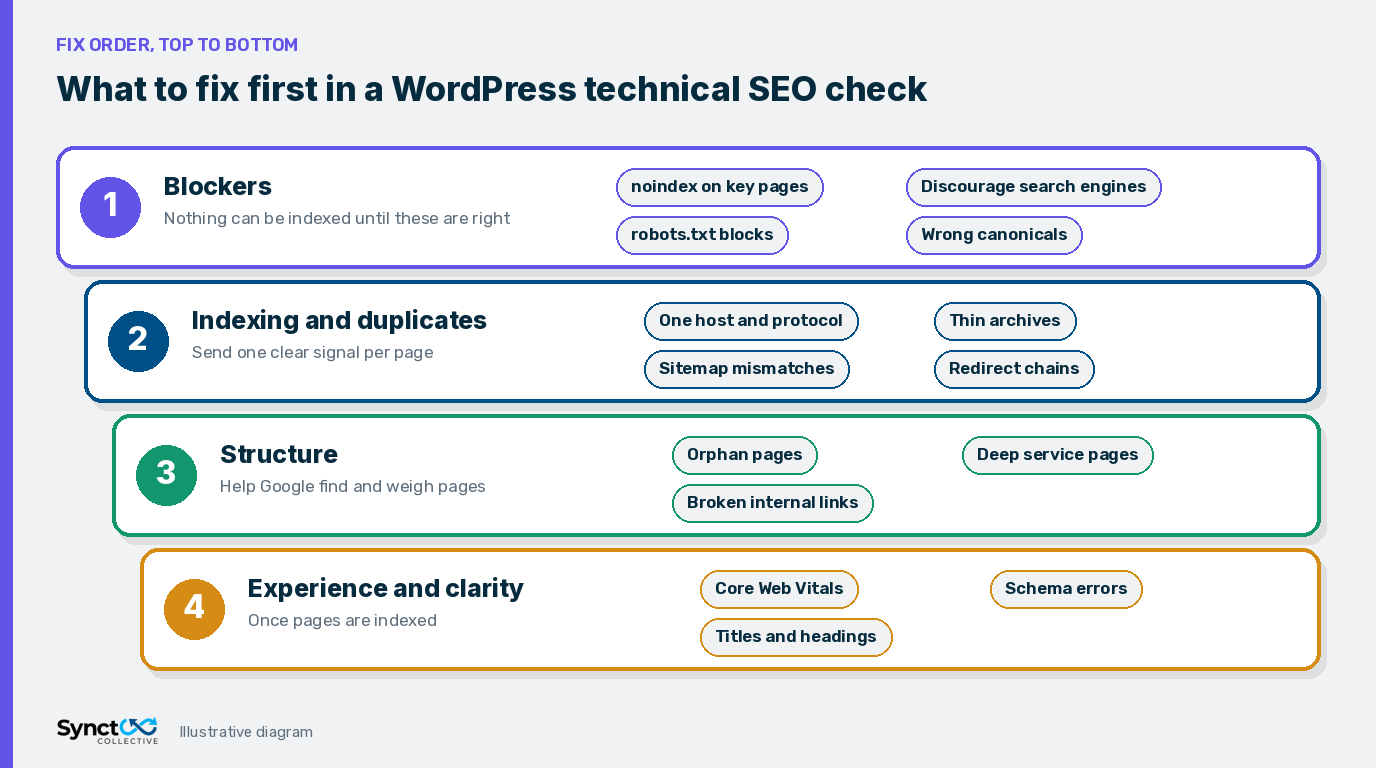
| 1. Blockers | noindex on key pages, Discourage search engines, robots.txt blocks, wrong canonicals | Pages cannot be indexed at all until these are fixed. |
| 2. Indexing and duplicates | Host and protocol duplicates, thin archives, sitemap mismatches, redirect chains | Mixed signals waste crawling and split value across URLs. |
| 3. Structure | Orphan pages, deep service pages, broken internal links | Google relies on links to find and weigh pages. |
| 4. Experience and clarity | Core Web Vitals failures, schema errors, duplicate titles, heading issues | Improves how pages perform and how clearly they are understood once they are indexed. |
Within each tier, start with the templates and pages that matter most to the business: the home page, core service pages and the posts that already earn impressions in Search Console.
Common WordPress findings
When we review WordPress sites, the same issues come up again and again:
- "Discourage search engines" left on, or a staging noindex carried over to the live site.
- Two sitemaps live at once, with the old one still submitted in Search Console.
- Tag archives indexed, each with one or two posts and no unique text.
- Redirect chains from two or three past redesigns.
- Service pages with no internal links from the blog.
- Page builder templates that fail INP or LCP on mobile.
- Duplicate Organization schema from the theme and the SEO plugin.
None of these are hard to fix once they are found. The value of a checklist is finding them in the right order.
Frequently Asked Questions (FAQs)
Q: What should a WordPress technical SEO audit include?
A: At minimum: crawl and index controls, canonicals and duplicate URLs, redirects and broken links, XML sitemaps, internal linking, Core Web Vitals, structured data and template level on-page basics such as titles, headings and alt text. A good audit also puts the findings in fix order, so blockers are handled before polish.
Q: What should I fix first?
A: Anything that stops Google from crawling or indexing important pages: a stray noindex, the Discourage search engines setting, robots.txt rules or canonicals pointing at the wrong URL. After that, fix duplicates, redirects and sitemaps, then internal links, then speed and schema.
Q: Which free tools can I use?
A: Google Search Console (Page indexing, Sitemaps, URL Inspection and Core Web Vitals reports), PageSpeed Insights, Google's Rich Results Test, the Schema Markup Validator and a desktop crawler. Screaming Frog's free version crawls up to 500 URLs, which covers most small business sites.
Q: Does WordPress create duplicate content by default?
A: It can. Tag and category archives, author archives, date archives, attachment pages and URL parameters can all produce extra URLs with thin or repeated content. Most of this is controlled in your SEO plugin, so the job is to decide which archives deserve to be indexed and noindex or redirect the rest.
Q: How often should I run a technical SEO check?
A: After any redesign, theme change, migration or major plugin change, and otherwise every few months. Search Console's Page indexing report is worth a quick look every month because it often shows problems before traffic drops.
Q: Does technical SEO affect AI search?
A: AI search tools can only use pages they can reach and read. If a page is blocked in robots.txt, not indexed or hard to parse, it is unlikely to be used as a source. Good technical SEO does not guarantee a mention, but poor technical SEO can rule a page out.
Want the checks done for you?
If you would rather have the audit and the fixes handled, our WordPress SEO Fix Sprint is a fixed-price technical and on-page audit with the fixes implemented, staged and logged. For speed problems specifically, see our Core Web Vitals fix, or explore our wider WordPress SEO services. If you are an Isle of Man business, see our WordPress SEO services in the Isle of Man.


